Lesson 05: The CUDA Platform Stack
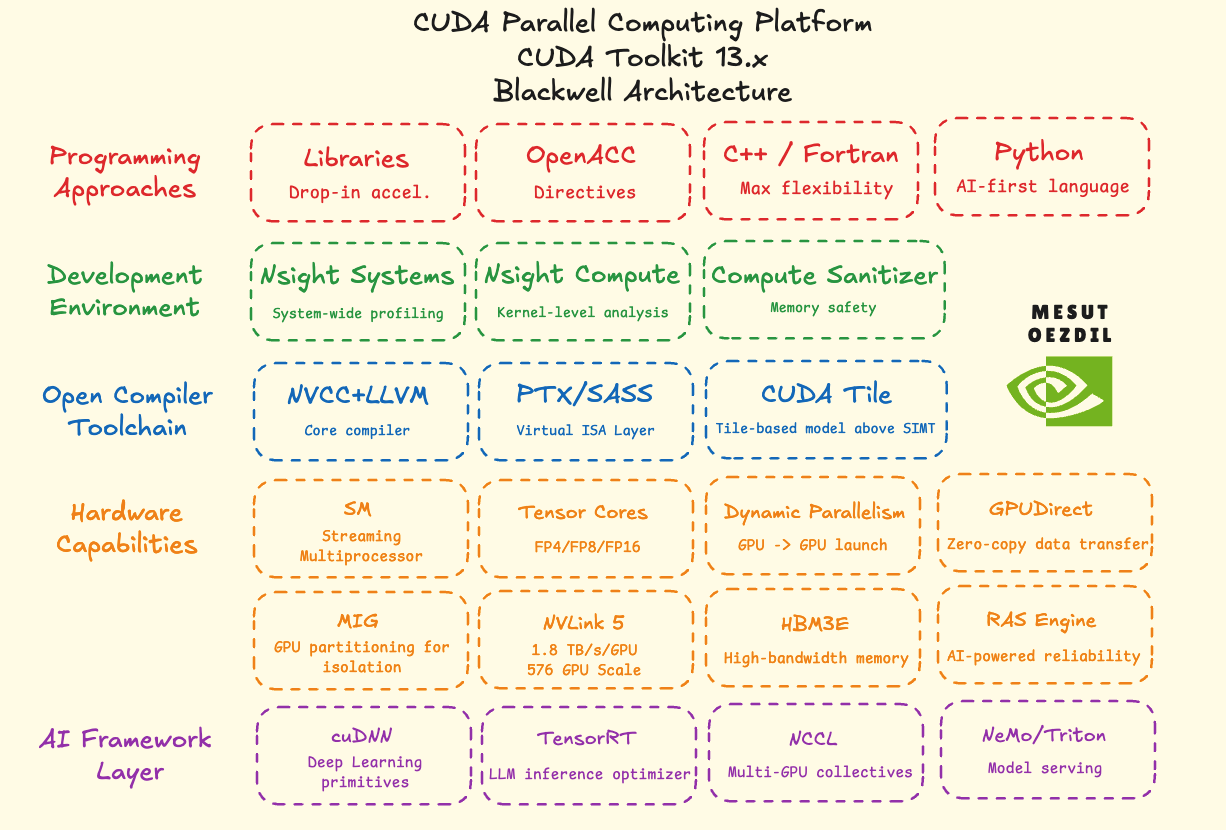
This lesson shows the full CUDA platform as it ships with Toolkit 13.x for Blackwell. It has five layers, with languages at the top, hardware at the bottom, and tools in between.
Programming languages
- CUDA C/C++ is the main language for writing kernels. Lessons 00 to 04 all used it.
- OpenACC and CUDA Fortran add GPU support through code annotations, so you do not write kernels by hand.
- Python reaches the GPU through libraries like CuPy and Numba.
All four run on the same GPU hardware.
Development tools
- Nsight Systems records a timeline of CPU and GPU work. It shows where the application spends its time.
- Nsight Compute looks at one kernel and shows how well it uses the hardware.
- Compute Sanitizer runs the program and reports memory errors inside kernels.
Compiler toolchain
nvcc compiles .cu files. Every lesson so far called it in the compile step. It sends host code to the normal C++ compiler and device code to the NVIDIA compiler. Device code first becomes PTX, a virtual instruction set not tied to one GPU. The GPU driver then turns PTX into SASS, the real instructions for that GPU. The binary stores the PTX, so the same program can run on future GPUs without a rebuild.
Hardware capabilities
- Tensor Cores are units inside each SM built for matrix math. They are separate from the FP32 cores, and much faster for FP16 and FP8 matrix work.
- MIG splits one GPU into up to seven independent parts. Each part acts like its own GPU.
- Dynamic Parallelism lets a running kernel launch another kernel from the GPU, without going back to the CPU. In Lesson 00, the CPU launched kernels. Dynamic Parallelism moves that step onto the GPU.
- GPU Direct lets GPUs send data to each other or to a network card directly, without going through system memory.
[!NOTE] The SM is the physical processor blocks run on (Lesson 02). Lesson 03 listed the FP32 cores per SM.
AI framework layer
- cuDNN is a library of GPU operations for deep learning. PyTorch and TensorFlow use it for convolutions, attention, and similar operations.
- TensorRT takes a trained model and makes it run fast on a specific GPU.
- NCCL handles communication between GPUs. You need it to train on more than one GPU at a time.
Visual
Glossary
- PTX (Parallel Thread Execution): the in-between instruction set that CUDA compiles device code to first. It is not tied to one GPU. The driver turns it into real GPU instructions at runtime.
- SASS (Streaming ASSembler): the real machine code for a specific GPU. PTX becomes SASS before it runs.
nvcc: the CUDA compiler. It handles host and device code in the same.cufile.- Nsight Systems: profiler that shows a timeline of CPU and GPU work for the whole application.
- Nsight Compute: profiler that measures how well one kernel uses the GPU hardware.
- Compute Sanitizer: tool that finds memory errors inside kernels while the program runs.
- MIG (Multi-Instance GPU): splits one physical GPU into isolated parts. Each part acts as its own GPU.
- Tensor Core: matrix-multiply unit inside each SM. Faster than regular FP32 cores for matrix work.
- Dynamic Parallelism: a kernel on the GPU can launch another kernel without going back to the CPU.
- GPU Direct: lets GPUs move data to each other or to a network card without going through the CPU.
- NCCL: library for communication between GPUs. Used for distributed training.
- cuDNN: library of GPU operations for deep learning. PyTorch and TensorFlow use it under the hood.
- TensorRT: makes a trained model run fast on a specific GPU.